Instructions
When a customer has multiple Ship to Addresses, QODBC can only display only one Ship to Address which is set as the "Default" in QuickBooks.
How to Get Specified ShipToAddress in QODBC
If you want to change the Ship to Address displayed in QODBC, you need to change the default Ship to Address in QuickBooks first (as below). And then you could get it in the ShipToAddress field in Customer table using QODBC.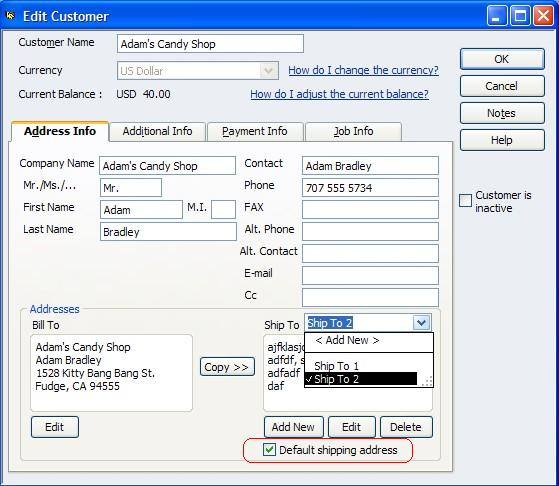
Was this article helpful?
That’s Great!
Thank you for your feedback
Sorry! We couldn't be helpful
Thank you for your feedback
Feedback sent
We appreciate your effort and will try to fix the article